Pepi House: Happy Family
- 4.2
- Rating
- 50.00M
- Installs
- Free
- Price

 Analysis by App-foxy
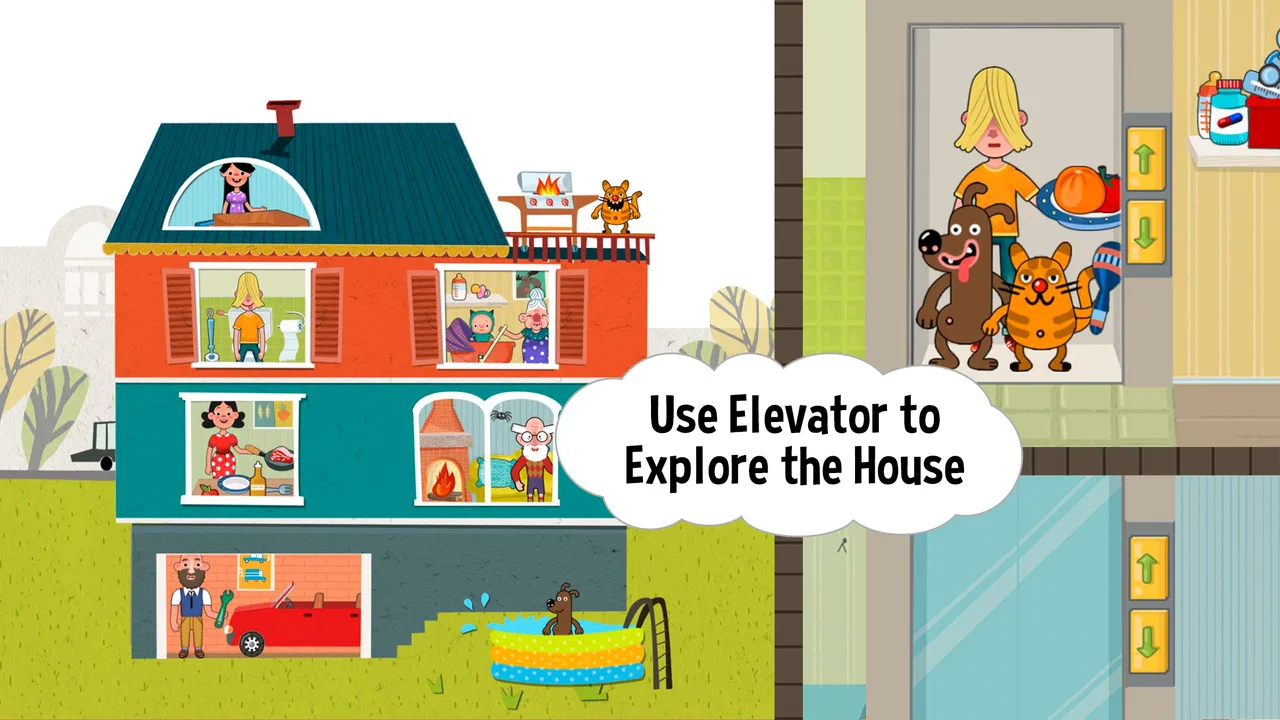
Pepi House: Happy Family is the kind of game I open when I want something calm, visual, and easy for a child to understand without a long tutorial. Developed by Pepi Play, it turns a house into a small pretend-play space where players can move characters, handle household objects, and invent their own family scenes. It is an educational game for Everyone, but its learning comes through exploration rather than quizzes, spelling exercises, or obvious lessons.
My first impression was that the game is less about “winning” and more about discovering what happens when I touch something. That distinction matters. A child who expects levels, points, and a clear finish line may find it too loose, while a child who enjoys making up stories can stay with it for much longer. The central appeal is a simple loop: choose an action, see the scene respond, enjoy the small surprise, reset the room, and begin another story.
How the pretend-play loop works
I find the pretend-play loop works best when a child treats each small interaction as a story prompt, rather than searching for a hidden objective. A useful way to extend a session is to pause after a character or object changes the scene and ask what should happen next; that gives the child room to explain choices before starting another action. With that rhythm in mind, the next section looks at where the game can feel less obvious to new players.
You May Also Like

 Blood Strike: 2.5 Anniversary
Blood Strike’s Loadouts Turn Every Drop Into a Tactical Gamble
A close look at Blood Strike’s custom loadouts: how fast access to signature weapons reshapes its battle royale rhythm, rewards preparation, and narrows the gap between fights.

 Pandora - Music & Podcasts
Pandora’s Music Is Easy to Start, but Harder to Recover
Pandora’s strength is its low-effort path from a seed to a station. Its weak spot is how much confidence it asks you to place in connection, setup, and quiet recovery.

 8 Ball Pool
 Is Built on Rivalries, Rematches, and Routine
A close look at the rivalries, rematches, shared routines, and unanswered safety questions that turn a quick pool match into a persistent mobile community.

 Samsung Music
’s Quiet Strength Is Playing What You Already Own
Its reach comes less from spectacle than from dependable access to a personal library. That simplicity is both the app’s strongest retention engine and its ceiling.

 AccuWeather: Weather Radar
AccuWeather Review: A Quick, Clear Forecast for Everyday Decisions
For everyday plans, the best forecast is the one you can understand quickly. AccuWeather makes rain timing, radar, and local conditions easy to act on, with a few trade-offs.

 Hill Climb Racing
Why Hill Climb Racing Still Turns Crashes Into One More Run
A tiny car, a bumpy hill and one more upgrade: Hill Climb Racing keeps resurfacing because its simple chaos makes every near-miss feel personal.
More From Our News Desk
View All News


The first action is deliberately simple
Starting a session requires very little explanation. The house presents a familiar setting, and the player can begin by selecting a character or interacting with an object that catches the eye. I like this immediate approach because it removes the usual barrier found in educational games: there is no need to understand a menu structure before play becomes interesting.
The first useful discovery is that the house works as a collection of little situations rather than one single puzzle. A player can focus on a room, move between parts of the home, or follow a character through an activity. That makes the experience approachable for younger children who prefer tapping and dragging over reading instructions. It also gives older children enough freedom to create scenes instead of repeating a fixed sequence.
For a parent, this makes the game easy to introduce during a short quiet moment. I would hand it to a child who is waiting at a restaurant, settling down after a busy day, or looking for a gentle activity before bedtime. The important point is to frame it as a digital dollhouse, not as a traditional game with a target to complete. That expectation makes the open-ended design feel intentional rather than incomplete.
The strongest early interactions are the ones that connect an action with a familiar household response. Moving a character, selecting an item, or arranging a small scene gives the child a reason to test another object. This is where the educational value quietly appears: the player practices cause and effect, sequencing, observation, and imaginative communication without being asked to identify those skills.
Feedback keeps curiosity moving
The feedback rhythm is the real engine of the experience. I perform a small action, the house reacts, and that reaction suggests another action. The response may be visual, character-based, or simply a change in the scene, but it gives the player enough information to understand that the tap or drag mattered. That immediate connection is much more useful for young players than a screen full of instructions.
What I found especially effective is the way ordinary objects become prompts. A child does not need to know the “correct” use of everything before experimenting. The game encourages a trial-and-see approach, which can lead to playful combinations and short stories. One character can become the center of attention, while another object changes the setting around them. The player is not merely watching an animation; they are deciding what should happen next.
This feedback is also why the game can work for children who are not confident readers. The experience communicates through movement and visual context, so a child can participate before having strong literacy skills. Adults can join in by asking questions such as, “What do you think this character is doing?” or “What should happen after that?” In my experience, those questions turn a solitary tapping activity into a small storytelling exercise.
There is a trade-off, though. Because the responses are designed to support free play, they do not always provide the clear confirmation that a structured learning app offers. A child practicing numbers, phonics, or factual knowledge will not get the same focused reinforcement here. I would choose a dedicated educational lesson app for a specific academic goal and use this one for language, imagination, and social play around everyday family life.
The reward is the story, not a score
Many games reward progress with points, badges, unlocked stages, or a visible achievement screen. This one uses a softer reward: the scene becomes more interesting because the player has shaped it. A character is placed somewhere, an object is used, and suddenly there is a story worth continuing. That reward can feel small to an adult, but it is meaningful to a child who enjoys making a situation unfold.
I appreciate that this approach avoids pressure. There is no need to replay a difficult section to improve a score, and a child can stop after creating one amusing moment. The reward is immediate enough to maintain attention but not so aggressive that it turns every interaction into a competition. For relaxed family play, that is a sensible choice.
The open-ended reward also supports different personalities. A child who likes arranging scenes may spend time placing characters and objects. Another may focus on movement and reactions. A third may narrate an entire family routine aloud. The game leaves room for those styles instead of forcing every player through the same challenge.
One practical tip is to use the game as a prompt rather than leaving it entirely silent. After a child creates a scene, I would ask them to explain who everyone is, what happened first, and what might happen next. This turns the reward from a quick visual reaction into a short exercise in vocabulary, sequencing, and perspective-taking. It is a more useful way to play than simply encouraging faster tapping.
The in-app purchase model is worth considering before handing over a device. The game itself is free, while individual purchases range from $1.49 to $2.49. That makes it easy to try without an initial payment, but an adult should still manage purchasing access if the device is shared with a child. The free entry is helpful for testing whether the open-ended format suits your family, especially if your child normally prefers games with explicit objectives.
Resetting the house gives each session a fresh start
The reset part of the loop is subtle but important. Because there is no permanent campaign to protect or complicated progress path to maintain, a player can finish one little story and begin another without feeling that the previous scene has to be preserved. The same home can become a different setting simply because the characters, objects, and actions are rearranged.
This is where the game differs from a puzzle or level-based title. In a puzzle game, resetting may mean failure. Here, resetting is closer to clearing a play area before starting a new pretend scenario. That makes short sessions comfortable. A child can play for a few minutes, leave, and return later without needing to remember a mission or recover a precise point in the story.
I also see value in this design for siblings. One child can create a family scene, then another can take over and reinterpret the same home. They may not agree on what should happen, but the flexible structure gives each player space to direct the action. Adults can use that opportunity to encourage turn-taking: one person chooses the characters, another decides the setting, and everyone explains the scene afterward.
The limitation is that a player looking for lasting progression may feel that sessions blur together. There is no strong sense of building toward a final achievement in the way a platform game or educational course does. The reason to return is not to unlock a new rank; it is to invent a new situation. That is satisfying only if the player enjoys imagination as the main form of progress.
What makes it educational in everyday use
Calling this an educational game makes sense, but I would describe the learning as indirect. The house gives children a familiar context for practicing choices, relationships, routines, and simple storytelling. When I play alongside a child, the strongest learning moments come from conversation: naming objects, describing actions, predicting what might happen, and comparing one family scene with another.
A realistic use case is a child who is learning to express a daily routine. Instead of asking them to recite steps from a worksheet, a parent can invite them to create a morning scene in the house and explain what each character does. The child can then change the order and talk about why the story feels different. The game supplies the visual prompt, while the adult supplies the questions that turn play into communication practice.
It can also help a child explore social situations in a low-pressure way. A parent might ask how two characters should share a space, help one another, or respond to a household event. The game does not replace real conversation or guided social learning, but it gives children something concrete to discuss. That is more useful than treating the app as an electronic babysitter with no interaction around it.
Another non-obvious strength is its suitability for mixed-age play. A younger child can handle the direct interactions, while an older sibling can invent dialogue or organize a longer story. The same scene therefore supports different levels of participation. I would not expect the game to challenge an older child academically, but it can still work as a cooperative storytelling tool.
Where it sits beside other family games
Compared with a structured learning app, Pepi House offers less measurable practice and more freedom. There are no spelling rounds or arithmetic drills to guide a child toward a defined skill. If your priority is school preparation, another category of app will be more efficient. If your priority is imaginative play with a familiar setting, this game has a clear advantage because the child controls the scene.
Compared with a digital dollhouse, its appeal comes from the responsive interactions rather than simply dressing or positioning characters. Compared with a storybook app, it asks the player to create the sequence instead of following a fixed narrative. Those differences explain both its charm and its limits: the experience feels personal, but it can seem directionless when a child wants the app to tell them what to do.
The game has been available since September 21, 2016, and its current version is 1.15.2. It supports devices running Android 6.0 or later. Those details make it relevant for families using an older compatible device, although the actual comfort of play will still depend on screen size and responsiveness. A larger tablet is better for shared play because children can see the whole scene and adults can participate without crowding the controls.
Who should try it, and who should skip it
I would recommend it to preschool and early-school-age children who enjoy pretend families, household routines, and making up dialogue. It is also a good option for parents who want an app that can become a conversation starter rather than a performance test. The Everyone age rating reflects its broad family-friendly positioning, while the simple interactions make it approachable for children who are still developing reading confidence.
I would skip it if the child needs a clear objective every time they play. Some players become frustrated when a game does not announce the next mission or provide a visible sense of completion. I would also choose another option for focused academic practice, competitive play, or deep character progression. This is not the right tool for measuring whether a child has mastered a particular school topic.
Parents should also decide how they feel about open-ended screen time. Because another session begins whenever a new story comes to mind, the game does not naturally signal a final stopping point. A simple household rule works better than waiting for the app to end: finish one scene, tell the story, then put the device away. That preserves the creative benefit without allowing the loop to run indefinitely.
My verdict on the action-feedback-reset cycle
The core loop is coherent: I take a small action, the house responds, the response suggests a new possibility, and the scene can be cleared for another story. The reward is not a trophy but the feeling that I made something happen. That makes the game unusually gentle compared with titles built around failure, speed, or competition.
Its strongest feature is freedom with enough visual feedback to keep that freedom from feeling empty. Its weakest point is the same freedom: children who need structure may run out of direction quickly. I also think the best results come when an adult occasionally joins the play, because conversation unlocks much more of the educational value than tapping alone.
With an average rating of 4.2 from around 255 thousand ratings, the game has attracted a substantial audience, and it has passed 50 million installs. Those figures fit my overall impression: this is an accessible family-play title with a broad appeal, not a specialist learning tool. It is free to start, rated for Everyone, and supported by optional purchases priced per item, so families can test the basic experience before deciding whether to spend.
After using it, I see Pepi House: Happy Family as a digital playroom rather than a conventional lesson or challenge game. I would recommend it to a friend whose child likes inventing family stories and needs a calm activity with immediate visual responses. I would not recommend it as a replacement for a focused educational curriculum. Within its intended space, though, the action-feedback-reward-reset rhythm works well: every session ends not because the game declares victory, but because the player has finished one story and is ready to imagine another.
FAQs for Pepi House: Happy Family
01What is Pepi House: Happy Family?
Pepi House: Happy Family is a virtual dollhouse app designed for children. It allows kids to explore and interact with various rooms and characters in a family home setting. The game encourages creativity and imagination by offering numerous activities and interactive elements within the house.
02Is Pepi House: Happy Family safe for children?
Yes, Pepi House: Happy Family is designed with children in mind. It features a child-friendly interface and does not contain any inappropriate content. The app encourages learning through play and is free from third-party ads, ensuring a safe environment for kids to explore and enjoy.
03What age group is Pepi House: Happy Family suitable for?
Pepi House: Happy Family is ideal for children aged 3 to 7 years. The app's intuitive design and engaging content cater to young users, helping them develop fine motor skills, creativity, and problem-solving abilities while having fun in a virtual family environment.
04Does Pepi House: Happy Family require an internet connection?
No, Pepi House: Happy Family does not require an internet connection to play. Once downloaded, the app can be accessed offline, making it a convenient option for entertainment during travel or in areas with limited internet access.
05Are there in-app purchases in Pepi House: Happy Family?
Pepi House: Happy Family may include some in-app purchases to unlock additional content or features. However, the core game offers plenty of free activities and interactions, providing a fulfilling experience without the need for extra purchases. Parental controls can be used to manage any in-app purchase options.
Pros
- Engaging family-friendly gameplay.
- Colorful and appealing graphics.
- Easy to navigate for kids.
- Encourages creativity and exploration.
- No in-app purchases pressure.
Cons
- Limited free content available.
- Some tasks can be repetitive.
- No multiplayer mode.
- Requires internet for updates.
- Ads can interrupt gameplay.

Pepi House: Happy Family
Gallery